How to take screenshots on Android
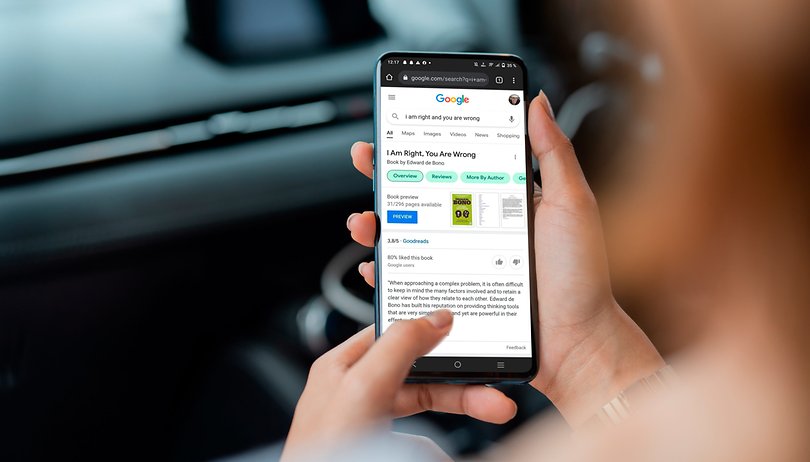

Looking for how to take screenshots on your Android phone? Whether you have a Samsung, (more companies) device with either Android 11 or Android 12 the process is quite easy! In this short guide, we will show you how to take screenshots and a few other tricks related to them, like gesture controls, to truly master your screenshot game!
Jump to:
- Before you begin: screenshots and tricks in Android
- How to take a screenshot on all Android phones
- How to take a screenshot on specific brands
- Tips and tricks for taking screenshots
- More tricks for mastering your phone
Before you begin: Screenshots and tricks in Android
I know, screenshots are tricky. To demonstrate my frustration, I will admit that until I actually had to write this guide I believed that in order to take a screenshot I had to press all the hardware buttons at once – and this obviously only worked half the time. Apparently, that must have been the case in the past? I honestly can't remember where I picked up this habit.
Thankfully Android 11 and Android 12 have the same screenshot procedure that saves you from a lot of trouble. Even if you are switching from a Samsung Galaxy with their One UI, to a Xiaomi or a Motorola with their MIUI and MY UX operating systems, you can be certain that by pressing the right buttons you can quickly get a screenshot. Yes, it is not as convenient or versatile as using the little gestures or tricks that each manufacturer has implemented – but hey, at least it's universal.
Aside from these frustrations, the Android platform offers a very wide range of customization when it comes to how you take your screenshots and what you do with them. In this article, we will see a few editing and cropping tricks and tips. You'll also find links to other articles and further guides, for example on how to take rolling screenshots or screen recordings.
To finish this How To guide you will need: Any Android phone.
How to take a screenshot on all android phones.
Okay, no more teasing, the universal way to snap a screenshot in any android phone (at least the few dozens I have checked) is to use physical buttons.
In order to take a screenshot, you have to press the Power Button + Volume Down.
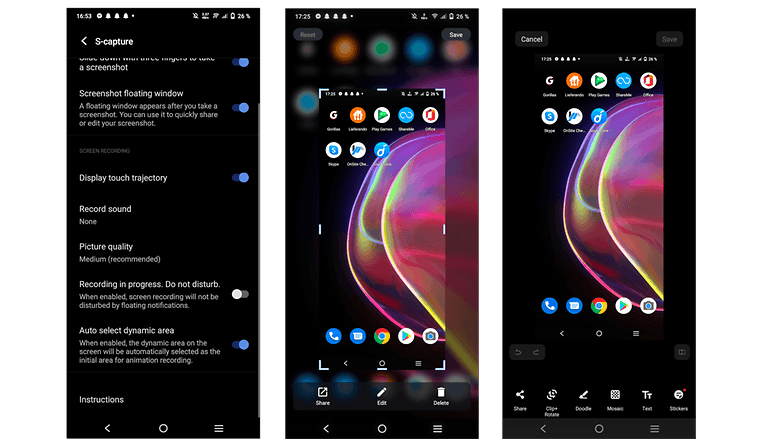
And this is basically it! Easy huh? My frustrations are over. To find your screenshot you can either tap on the preview window that will pop up on your screen, or navigate to your screenshot folder through your gallery app.
If you don't want to use any physical buttons, many phones allow you to assign a few combinations of gestures like a three-finger swipe. To activate this feature you typically have to go to Settings -> Shortcuts & accessibility -> S-capture and toggle "Slide down with three fingers to take a screenshot"
How to take a Screenshot on specific brands.
As we said, every phone manufacturer has its own software on top of the Android platform, allowing for further customization. Here we will see some of those features by brand.
Screenshots on Samsung Galaxy phones
Samsung has its own long list of tricks to allow for screenshots. I think the most convenient way is the palm swipe, which allows you to get an instant screenshot by simply swiping your palm on the screen from left to right. The motion does need a couple of tries to master but once you figure it out you won't need to press a button ever again!
To activate Palm Swipe go to Settings -> Advanced features -> Motions and gestures -> Palm swipe to capture and toggle it on. (This feature is likely the reason, why the "Slide down with three fingers" gesture described above is not available on Samsung phones.)
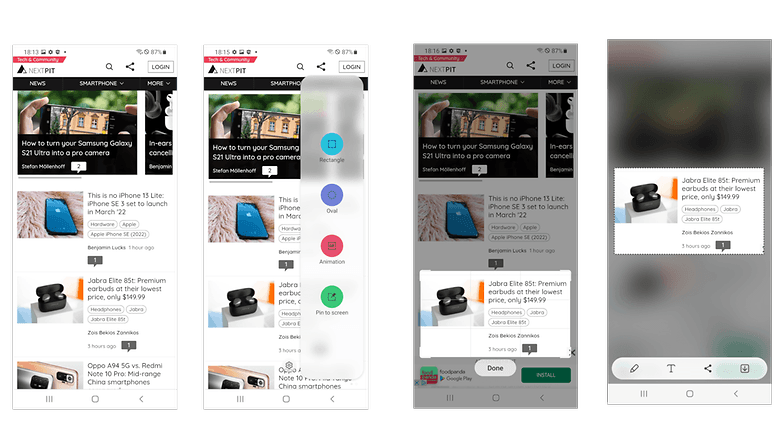
Some Samsung devices offer another convenient tool, called Smart Select through the Edge panel. The Edge panel basically acts as a series of quick shortcuts that you can use quickly. To activate it go to Settings -> Display -> Edge screen -> Edge panels and from there select Smart Select.
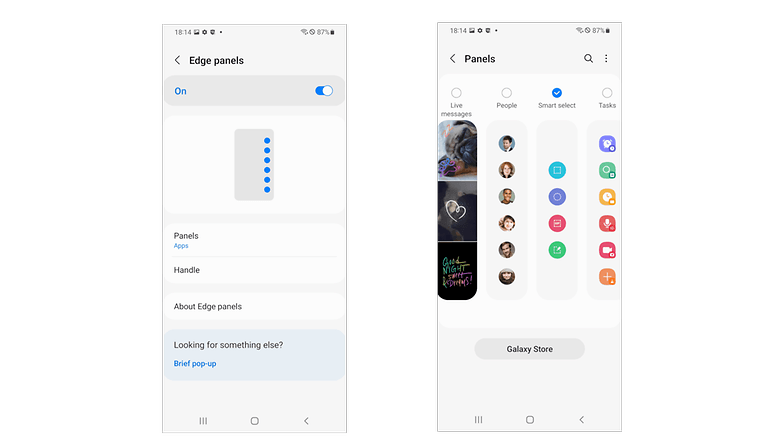
Then bring up the panel by swiping on the right edge of your screen, choose the shape of the screenshot you want to take, circle or frame the content you are interested in, and select Done.
Another trick Samsung devices can do is to have Bixby take screenshots. Simply say "Hey, Bixby!" and request "Take a screenshot, please."
Finally, if you are fancy enough to own an S-Pen then you can use it to get screenshots through the Air Command menu. Open it and select Screen Write and then Save.
Other manufacturers: Google, Motorola & more
Screenshots on Google Pixel phones
While most pixel users mostly use the physical buttons to snap screenshots, there is also the ability to use gestures like the three-finger swipe and a couple of special ways. If you want to use a different gesture you can swipe from the bottom of the screen and hold, then you choose an app and then you press on Screenshot. Another way is to use the 3-button navigation on the bottom: You tap on Overview, then find the app and tap on Screenshot.
Screenshots on Motorola phones
Motorola's MY UX operating system offers the three-finger option. But: You will have to navigate through a different menu to find it. What you have to do is open the Moto App -> Moto Actions -> Three Finger Screenshot. And you are good to go!
Screenshots on Xiaomi phones
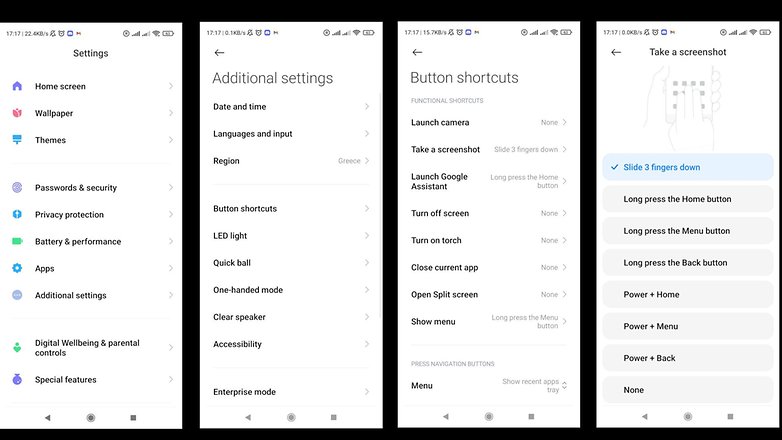
In Xiaomi devices similar gestures are available but you may have to search a bit differently for the gestures. In MIUI you have to navigate to your Settings -> Additional settings -> Button shortcuts -> Take a screenshot, and from there select the gesture that fits you the best from over 7 different combinations.
All other devices:
In case you do not know where to look for the settings in a device that we haven't covered here, you can always use the "Search Options" feature that is present in all Android 10, 11,12 devices. This is how to do that:
Open your settings -> tap on the search bar at the top -> search for "Screenshot"
Tips and tricks for taking screenshots
There are a couple more things that can help you utilize your screenshots better, and some grave mistakes that you can avoid.
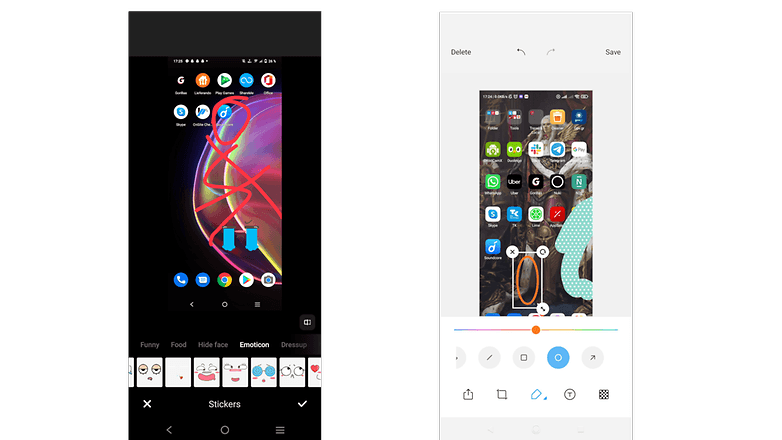
After you take the screenshot, a preview of it will appear on a tiny window in a corner of your screen. If you tap that window you will see a few selections, usually Edit and Share. Their functions I believe are self-explanatory. Keep in mind that a lot of those features are device-dependent and although they are present in one shape or form in every device, the actual tools vary.
- By pressing Edit you access the integrated editing software of your device to quickly make changes to the image like cropping, doodling over it, rotating it and applying stickers.
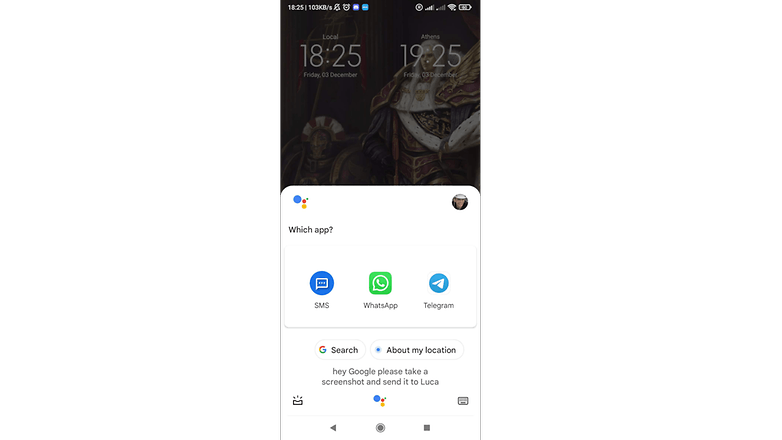
- Busy Hands? You can use the Google Voice Assistant to do it hands-free and share it with a contact: "Hey Google" -> "Please take a screenshot and text it to Luca."
- Be mindful of what you screenshot. Some apps do not allow for screenshots, while some messaging apps, like Snapchat, will send a notification to other members of the chat when you screenshot the conversation. Our linked article with Tipps & Tricks for Snapchat tells you how to prevent that from happening.
- There is also the ability to create very long screenshots of content by scrolling through an app. You already guessed it: We have a guide on how to do that.
- Last but not least you can use a special app; These often bring toolboxes with different cropping tools and other handy quick access ways that allow you to do some serious screenshot-taking! We feature some every now and then so keep an eye on here!
More tricks for mastering your phone
- Different ecosystem? No problem! How to join FaceTime from Android
- WhatsApp: ultimate tips and tricks for Android
- How to use Samsung Smart Switch to transfer content to Samsung smartphones
- How to use the dynamic theme on Android 12
What is your favorite way to take a screenshot? Do you know any good screenshot tricks? Let me know in the comments!


Recommended editorial content
With your consent, external content is loaded here.
By clicking on the button above, you agree that external content may be displayed to you. Personal data may be transmitted to third-party providers in the process. You can find more information about this in our Privacy Policy.