The best racing games for Android in 2022

Read in other languages:
Racing games are one of the most popular genres of mobile gaming. If you’re a driver looking to compete, enjoy a realistic driving experience, or just drift around, we have just the game for you. Here is what we think the seven best racing games for Android smartphones and tablets as of 2022!
NextPit's gaming central
Best racing games for Android 2022
Jump to:
- Real Racing 3
- Need for Speed: No Limits
- Asphalt 9: Legends
- GT Racing 2
- Traffic Rider
- Horizon Chase
- Beach Buggy Blitz
- Mario Kart Tour
- #DRIVE
1. Real Racing 3
Download Real Racing 3 from the Google Play Store
For serious driving and realistic simulation, Real Racing 3 takes the chequered flag. Each car behaves according to its specs in terms of tire traction, weight, handling, etc. In Real Racing 3, you can race on 40 circuits at 19 rear world locations with more than 250 different official cars from the likes of Lamborghini, Porsche, Mercedes-Benz, Audi, and Ferrari. There are also numerous multiplayer modes to choose from so you can race your friends.
The game also looks gorgeous, but those pretty graphics and licensed content take up space. Make sure you have at least 2.5GB free before you hit the download button.
2. Need for Speed: No Limits
Download Need for Speed: No Limits from the Google Play Store
No Limits launched in early 2015, but has gotten regular updates right up until June 2021. As well as updating the engine and graphics, EA has been slowly introducing new cars, tracks, and modes to the game. There's now a survival-of-the-fastest elimination tournament mode and customizable cars for luxury manufacturers such as Ferrari, Lamborghini, McLaren, Pagani, Koenigsegg, Hennessey, and more.
Need for Speed: No Limit's arrival was one of the most anticipated on Android, and its continued support makes it a real fan favorite. With realistic graphics and interesting circuits, No Limits is one of the best games for racing on asphalt.
While it scores high for its excellent graphics and gameplay, many users are annoyed by the number of prompts for in-app purchases.
3. Asphalt 9: Legends
Download Asphalt 9: Legends from the Google Play Store
The Asphalt series has been somewhat legendary on Android, and the games are often used by tech reviewers like us to test how smartphones and tablets can handle graphically intense gameplay. The ninth game in the series has real cars like the Lamborghini Veneno, which you can launch off numerous ramps and jumps, allowing you a rare opportunity to pirouette with your sports car. Asphalt 9: Legends has plenty of tracks with more than 60 of the world’s best speed machines. It’s an arcade racer that shines through its graphics, audio effects, and sheer fun factor.
As I mentioned, Asphalt 9 really hammers your device's memory and stretches its graphics capability to the limit. This beautiful, flashy game looks and runs best on high-end hardware with plenty of RAM and a good GPU. Like the previous game, there are several in-app purchases that the developer will prompt you to make - slightly marring the overall experience.
4. GT Racing 2
Download from the Google Play Store
GT Racing 2 is another title from Gameloft – developer of the above Asphalt 9 – is much more realistic than its arcadey brother. This is simply one of the best racing simulators for mobile devices. Choose from a selection of 71 cars from 37 top manufacturers. You can drive around 13 circuits - including the real Mazda Raceway Laguna Seca - from four different points of view and race at more than 1,400 events. The game is constantly being updated with new content, too, with 28 new challenges landing each and every week.
This is a great game if you like to modify the performance of your vehicle in the garage and test out your changes on the track in the most realistic racing simulation on Android.
5. Traffic Rider
Download Traffic Rider from the Google Play Store
Traffic Rider is a fast-paced, fun game for folks who are too tired of the "professional racing-themed games. In this, you ride a motorcycle or scooter around town while swerving in and out of traffic and making sure you do not bump into another vehicle. The game also has a career mode as well as an endless mode where you can go on and on until you're bored.
6. Horizon Chase
Download Horizon Chase from the Google Play Store
Horizon Chase is a racing game that tries to emulate the racing titles of the 80s and 90s. Indeed, the developers who created this game have experience with some of the classics from the last 20 years, and it is steeped in nostalgia. The mechanics are different from any of the other racing games on the list in that the controls are greatly simplified. However, thanks to its excellent music and throwback graphics, it offers not only one of the most interesting but one of the best racing experiences on Android today.
7. Beach Buggy Blitz
Download Beach Buggy Blitz from the Google Play Store
Blitz is the latest entry in the Beach Buggy Racing series and follows the same mechanics as titles like Mario Kart or Crash Team Racing. This is a racing game that’s intentionally less mature, and more focused on fun than high-adrenaline speed and realistic graphics. The races contain items that can be collected and used to attack other opponents or fend them off. It looks excellent on tablets but is perfectly playable on smartphones too.
9. Mario Kart Tour
Download Mario Kart Tour from the Google Play Store
Released in September 2019, Mario Kart Tour has gone on to rake up more than 50 million downloads and is arguably among the most popular racing games currently available for Android devices. The gameplay is chaotic, frantic, and fun – all at the same time. Yes, there are in-app purchases as well.
10. #DRIVE
Download #DRIVE from the Google Play Store
Fan of endless driving and racing games? Well, we're sure you'll like this game called #DRIVE then. A direct inspiration from rod and action movies from the 70s, the game is quite simple. All you need to do is to select a case, choose a place to drive, and hit the road!. Just make sure not to hit any obstacles. Currently, the game has a rating of over 4.5 stars on the Google Play Store.
Do you have any other racing game suggestions that you want us to add to this list? Let us know in the comments.
This article was last updated in January 2022. Older comments have been retained.









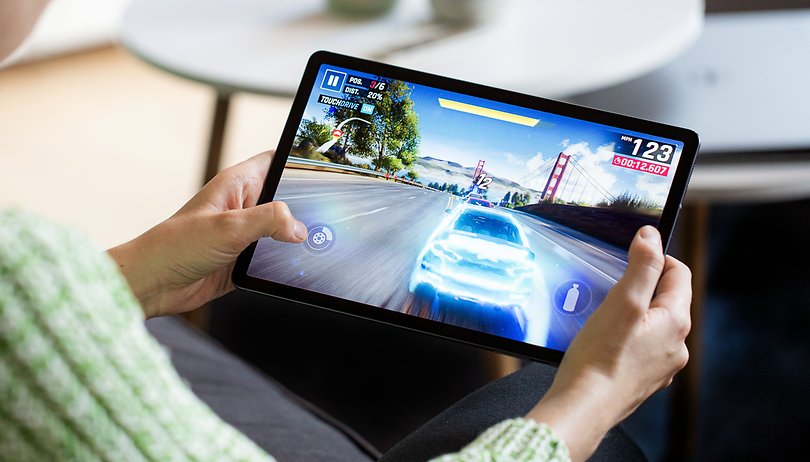
You show the tablet screen, its reason?
How could you possibly leave out the BADDEST of em all?? By far..CSR2 takes the cake!! Simple NOTHING more realistic/ADDICTIVE.. TRY it!!
good games!!
"The best racing games you can play on your smartphone" so why show a tablet?
I think Asphalt Xtreme should be there in your article and on the top.
The most realistic racing games on mobile are Real racing 3 and Assoluto racing because they are simulation games not arcade games like the the rest games on this list and these two have the best physics and graphics not like the shity physics on asphalt 9 ;) .
By the way Real racing 3 is the brother of Forza and Assoluto racing is the brother of Gran turismo.
Honorable mentions:
Gear club true racing
Car x drift racing 2
some cars looks so realistic, i love it! looking for affordable properties? visit here at #flatxph
Thanks for providing this list.! I am huge fan of Asphalt series. I have played 8 airborne, but never played Asphalt 9. Also, wish to try other games, too.
-
Admin
Sep 22, 2019 Link to commentDrive carefully
good racing game!!!
Best Racing Game using minimal storage with great graphics, gameplay, cars and tricks: Asphalt Nitro(from Gameloft). I can't stress how underrated this game is!
Reckless Racing (1,2 and 3) is better than Mini Motor Racing
Covered everything possible!!!