Note Everything


Read in other languages:
Featuring audio, text, picture and even barcode notes, Note Everything seems to be a program that could do just about anything. Over a year ago we tested the app with lukewarm results. Now it’s time for an update on this useful tool. Got it all down? Then off to the test we go!
| Reviewed version |
| 3.0.5 |
Features & Use
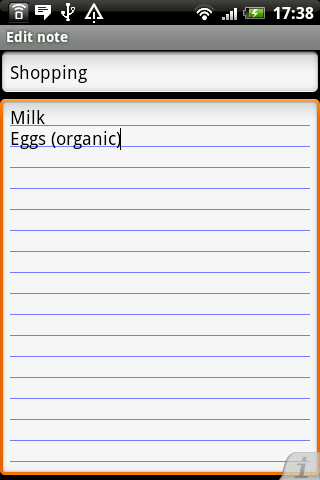
Just about anybody can do simple text notes. Note Everything has more up its sleeve and is becoming an all-arounder for all your note taking needs. Its Premium Version also includes a to-do feature.
Need to make a quick sketch? Or record an audio note-to-self? With Note Everything it’s a piece of cake.
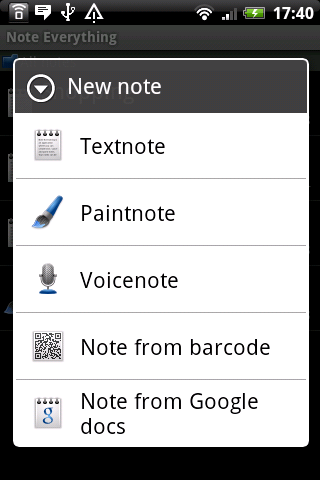
You can create different kinds of notes:
- Textnote
- Paintnnote
- Voicenote
- Note from barcode
- Note from Google docs (free plug-in required)
A picture can say a thousand words, right? Then just draw a sketch of something that you need to remember. You can be creative in the process by adjusting the color, stroke width and other options. With voice notes there aren’t any limitations except for the amount storage space on your SD card. Need your note as a QR-code? No problem! Note Everything can change your note into a code that can be scanned by other smartphones with barcode scanners. Pretty impressive, huh?
Another feature that requires an additional plug-in is the synch with GDocs. After installing this plug-in, you can save your notes to Google Docs and edit them on your computer.
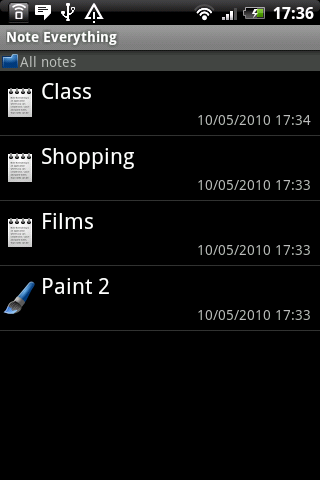
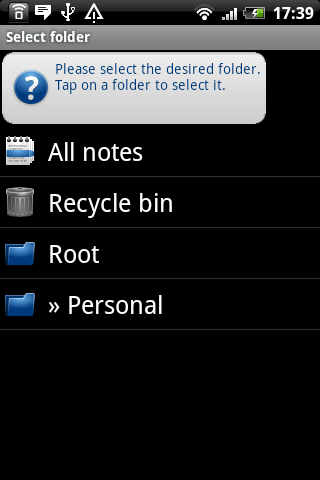
How do you keep track of all these different notes? Luckily, Note Everything provides a good folder system that keeps your files neat and organized. Simply create folders to move your notes to – it’s just that easy. Subfolders can also be created.
Sharing your notes as QR-code is a pretty useful feature. If your partner doesn’t have a smartphone with a bardcode scanner, you can send your notes via Bluetooth, e-mail, Flickr and many other sharing services, including GoogleDocs.
Need quick access to your notes? Just place a shortcut to your note on the homescreen and access it instantly.
Multiple import features make life easier for you if you’ve just switched over to Note Everything:
- Import from SD Card
- Massimport from SD Card (imports all .txt files from selected folder)
- Import from Palm memos
- Import from Outlook notes
- Import from Note Pad
- Import from OI Notepad
- Import from AK Notepad
With the search feature you can find just about everything. The app searches through both the titles and contents of your notes for search terms.
Advantages:
- Perfect for beginners
- Endless voice notes
- Easy-to-use
- Widget
- Shortcuts on homescreen
- Nice design
- Easy to customize
Drawbacks:
No notifications in the lite-version
What can you do with the PRO Version?
- Restore with backup
- Take photo notes
- Create to-do lists
- Picture notes
- Reminders
- Password protection
- Notes on your status bar
- Full backup on SD card
Screen & Controls
The controls are totally intuitive. In comparison to our first test, a lot of things have changed for the better with Note Everything. The new features have added some much-needed improvements to the app.
Note Everything scores pretty well in terms of design compared to its competitors. If that’s not enough for you, you also have the option of fully customizing your notes. The colors, text size and date formats can all be adjusted in the settings.
With the widget you have instant access to Note Everything. If you everything correctly, you can create text and voice notes in seconds.
Speed & Stability
Note Everything performed really well in our test.
Price/Performance Ratio
Note Everything can be downloaded for free from the Android Market and App Center.
Screenshots




I just deleted a very important note while I was adding information. "Revert" does nothing. Any clues?
If i start taking notes this app is noted.
its a great app but it isnt opening anymore
agree with Karian here!
I give this app an amazing review... even though I am not much of a note taker, I found myself using this app during a seminar. I very professional taking notes when not needed. It is simple and clean and very good UI.