Bluetooth File Transfer - Bluetooth Not Only for Roots


Harald “Bluetooth”, a Danish Viking king known for his communication skills, was the inspiration for a wireless technology bearing the same name. In the meantime Bluetooth has become a household name across the globe. With Bluetooth File Transfer root users can take full advantage of Bluetooth communication. Find out how well it actually works in our test.
| Reviewed version |
| 3.01 |
Features & Use
Bluetooth File Transfer can be used fully only by root users. Though it is possible to send files to another device without root rights, this option wasnot taken into consideration during our test. I’m counting on comments coming from non-root users on whether this actually works. Since Android 2.0 Bluetooth has become a standard feature on Android Phones. This app is intended for those who are still using an earlier Android version.
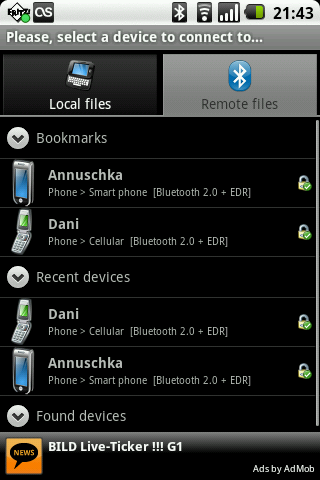
On the plus side: As soon as you start the app you are asked whether Bluetooth should be activated. Instead of making you search for it in submenus, the app lets you activate Bluetooth from the get-go. Your next step should be to pair up two devices by going to the Remote Files tab. The app then scans for any activated Bluetooth devices in the area and displays these under Found Devices. Once you’ve found the right device, you have to enter a made-up PIN to be entered by your pairing partner on his or her device.
To keep things organized, you can save Bluetooth devices to a bookmark list. The latest devices are also always listed under Recent Devices.
You can basically do just about anything with another person’s device once pairing has been completed. This could be a blessing or a curse depending on how you use it. All this unrestricted access can cause a lot of damage. I wonder if the app’s developers gave this problem a lot of thought. Not only can you rename and move files, but you can also delete entire folders. Not sure if your pairing partner would be too comfortable with someone having this kind of freedom.
Nevertheless, the app offers you a lot of options that you may be familiar with from file managers.
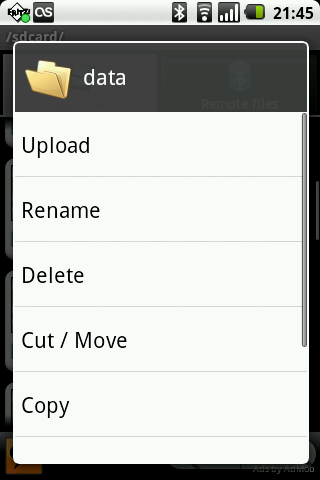
The following features are available in the context menu:
- Delete
- Cut / Move
- Copy
- Paste
- Select all
- Select none
- Invert Selection
- Send via Bluetooth
- Item Informations
- Share
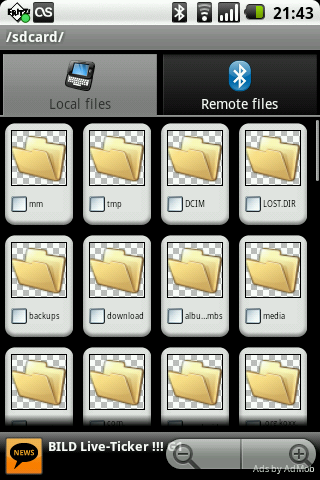
The app is divided into two basic tabs. Under the Local Files tab, you’ll find your own files and can then transfer them to another device via the context menu. Use the Remote Files tab to search through files on the receiving end.
You can stream songs and videos at any time, which can be pretty useful. Select a file with a tap and the media player starts playing the song automatically.
With the menu button you can access the following features:
- Upload
- Edit
- Create Folder
- View
- Find Files
- Refresh Folder
- Send Contacts
- Settings
- Choose Language
The following options are available under Settings:
- Use system thumbnails
- Cache size (Mb)
- Enabled
- Start on boot
- Stop when close
- Show notifications
- Show messages
- Alert on receive
- Destination folder
- Concurrent connections
- File Transfer Profile Settings
Bottom Line:
All in all it’s a neat and useful little app for root users that may grant people a bit too much unrestricted access. It may be fun to browse through another person’s device, but it isn’t secure in terms of privacy. Personally, I wouldn’t be happy with someone changing and deleting files from my phone without my knowledge. The functions themselves, however, work perfectly!
Screen & Controls
The controls are really simple to use. Everything is within easy reach using the two tabs, menu button and context menu.
The user interface is reduced to just the necessary minimum. Nice-looking icons make this app look a bit more appealing.
Speed & Stability
The data transfer speed depends on your Bluetooth version. During my test on a Nokia N71 the transfer speed was actually pretty good.
Crashes? None whatsoever.
Price/Performance Ratio
Bluetooth File Transfer can downloaded for free from the Android Market.
Screenshots















Works great with my LG Ally!