CamSam PLUS - Speed camera – Say Good-bye to Speeding Fines


I was using the Android app Copilot, but blimey was it ever getting on my nerves. I stuck it out as long as I could, but eventually lost patience with it and resorted to good old Google Navigation, which has been working out quite nicely for me. Even though it might not have as many features as some other navigations apps, it’s reliable and so far I felt it did everything I needed it to do.
Well, except for the whole 'Erm, please could you issue a warning when a speed camera is coming up' thing, that is: I don’t mean to imply that my conduct in traffic is anything but exemplary, but—it would do my pocket book a world of good if an app warned me about speed cameras. This is where CamSam PLUS - Speed camera comes in: the application supposedly acts as a speed and red light camera warning system. Let’s take a closer look at it, shall we?
| Reviewed version |
| 1.2 |
Features & Use
Test device: Dell Streak 5
Android version: 2.2
Mods: Root
CamSam PLUS - Speed camera provides a warning system which alerts users of speed cameras—and we found it to work remarkably well during our test runs!
According to CamSam PLUS’s market description, the app has over 47,000 cameras worldwide on record. Now, while I wasn’t able to verify each and every single camera, I did drive around in a 50km radius and noted that the application correctly displayed and warned me of all speed cameras in the vicinity.
Warnings are issued regarding cameras in proximity (displayed as a list), as well as when approaching one (displayed as radar). Distances to cameras are displayed, giving users enough time to react accordingly and adjust their speed if necessary. Both options can be displayed separately or together.
Throughout the test runs I was using both Google Navigation and CamSam PLUS, and it worked out quite nicely for me. Should CamSam PLUS be running in the background you will be notified about upcoming cameras at 500 metres at the latest. The app is equipped with voice messages, meaning you don’t need to keep keep glancing at the screen.
The ‘Online-Mode’ (which can be switched off if you so wish) displays information concerning mobile speed cameras every 5 minutes. This information is partly compiled by CamSam PLUS users (you can report speed cameras if you wish to do so). That said, all user-forwarded information is checked by the developers. Other sources of information (such as radio stations) are also tapped into. These features are only available in the PLUS version of the app, not in the free one.
We actually literally did a few test runs with the app, driving around and making sure that it correctly identified and issued warnings regarding all speed cameras in a 50km radius. CamSam PLUS did very well on all counts.
I wish there was a map feature proper to the app, but I am told that the CamSam PLUS developers plan to release it before the year is over.
Screen & Controls
CamSam PLUS - Speed camera is divided into three parts: ‘Radar’ (upcoming speed cameras), ‘List’ (all speed cameras in the vicinity) and ‘Settings’. All three can be accessed via buttons located near the bottom on the display. Go to landscape mode in order to access ‘Split’, an option which displays both Radar and List simultaneously and can be switched on/off in the settings.
The settings harbor the following options:
Warnings
Warn mobile speed cameras
Warn permanent speed cameras
Update database
De/activate the online mode
Sound
Warning volume
Voice message warnings
GPS notifications
Display
Splitscreen in landscape mode
Language
Select a language (English, Dutch, German, Italian, Spanish, French)
CamSam PLUS will conveniently switch back to whatever viewing mode (Split, Radar or List) you were using last.
‘List’ displays all speed cameras in the vicinity, including speed limits and information about how far away each speed camera is. The speed camera’s direction is indicated by pointing arrows.
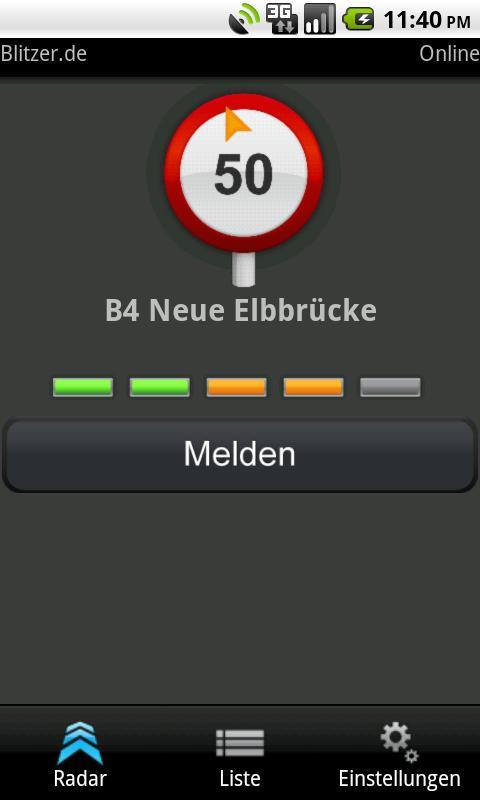
‘Radar’ displays the most imminent speed cameras. The distance is displayed by five bars that increase during the last 500 metres. Voice message warnings are also issued (these can be turned off in the settings).
As mentioned, ‘Split’ allows you to keep an eye on both List and Radar; this view mode worked out great on the Dell Streak which is 5”.
I am very impressed with CamSam PLUS in this category on the whole. The app is very easy to use.
Speed & Stability
CamSam PLUS - Speed camera ran very smoothly and efficiently on the Dell Streak 5—no crashes, no lagging. GPS detection was also very fast.
Price/Performance Ratio
For 4,99 € you can download an application that might help you save a few unnecessary expenses, thought it goes without saying that we should all be sticking to speed limits, they exist for good reason. CamSam PLUS - Speed camera is very dependable and will issue a head’s-up about upcoming speed cameras.
Screenshots
















jak odwrócę telefon to nie działa. mam telefon samsung galaxy s4