The best free fitness apps for Android and iOS

Training via fitness apps continues to boom in January 2021 thank to the pandemic still going strong across the world. If you are unable to – or do not want to go to the gym right now, you can find numerous apps in the App Store and Play Store that function as capable gym replacements. Many of these apps are, in fact, free.
In this article, we show you six of our favourites and explain just which fitness app is the best for you.
Jump to:
- Training via fitness apps: What do you want to achieve?
- This is how we rated fitness apps
- The best fitness apps for Android and iOS
- It's all in the mix: Fitness is more than just exercise
First things first: gyms and human trainers continue to justify their existence during and after the coronavirus pandemic. After all, it is hugely important, especially for beginners, that exercises are performed correctly. So here is an important tip for all budding home athletes: have someone watch you during your first workouts - or film yourself, if necessary, to make sure you don't get into the habit of being stuck with a bad posture. A slouched back, cramped shoulders, etc., can quickly lead to injuries.
If you have any injuries or illnesses, talk to your doctor before exercising. Also, be careful with workouts, because an app cannot gauge your fitness level, quite unlike a flesh-and-blood trainer. Before you start doing frog burpees or handstand push-ups, build up your muscles gently. Train with easier exercises using high reps rather than the other way around.
1. Workouts via fitness apps: What are you trying to achieve?
This is often the question your trainer asks first during your first attempt at the gym: "What do you want to achieve?" Since each app has individual strengths and weaknesses, you should be clear about where you want to end up - and what goals are realistic for you.
Do you simply want to feel better in your body and improve your flexibility? Do you want to build muscle and/or lose weight with the fitness app for that upcoming beach vacation? Either way, I'd like to recommend the following article to help get you started - because a fitness app is just one piece of the puzzle for a healthy body either way:
2. Here's how we rated fitness apps
We installed all of the apps on either Android or iOS devices and paid attention to the following different criteria:
-
Interface: Is the fitness app user-friendly? Can you find your way around different workouts right away or is the app structured in a confusing manner?
-
Fitness test: Is there an assessment test to determine the user's fitness level so that one can create a tailored workout plan? In a gym, a trainer would do this very important part during the trial period.
-
Warmup: Does the fitness app throw a hard workout at you right away? Or is there a warm-up routine with some dynamic stretches and light loading beforehand to improve performance and reduce the risk of injury?
-
Workout: How many workout routines are there? How are they implemented, both in terms of exercise selection and how they are presented in picture, video, and sound?
-
Price: Is the fitness app free to use? How is the subscription model structured and are there any additional services? Are there certain equipment required for training?
3. The best fitness apps for Android and iOS
Now we're getting down to the nitty-gritty: In the following segments, we have compiled our favourites as per the aforementioned criteria, while tacking on similar alternatives where applicable. Have we forgotten your favourite app? If so, we'd love to hear of your recommendations in the comments!
3.1 Bodyweight Fitness: A completely free fitness app (and open source!)
Interface: The interface of this app is simple and functional. However, you will notice that there is no dedicated design department employed here unlike the competition at Freeletics. On the plus side though, it's a completely free app that requires no login and is open source.
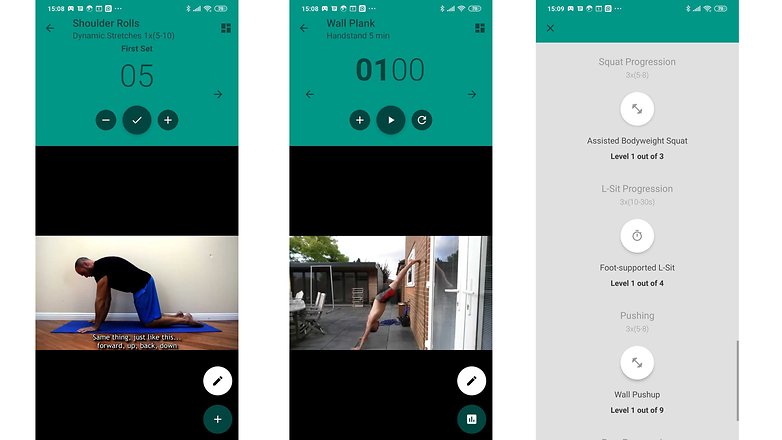
Fitness test: The fitness test of Bodyweight Fitness turns out to be a very short one. There is no medical disclaimer, but there is a lot of text to read. The developer could surely improve in this department.
Warmup: Warm-ups before any workout are well implemented. Bodyweight Fitness also offers separate stretching sessions, which are recommended for post-workouts.
Workout: The videos here cannot compete with the glossy videos of Freeletics and other apps in terms of production value, but they are functional and explain the exercises well. Accompanying sound ought to be helpful here, especially for beginners. Bodyweight Fitness does not offer different training plans, but there different intensities for most of the exercises shown. Some exercises such as wall planks or dips might be too challenging for beginners.
Price: Bodyweight Fitness is completely free for Android users. Those who want to treat the developers to a coffee protein shake can buy the Pro version for €2.79 in the Google Play Store. For iOS, Bodyweight Fitness costs €2.29.
You can find the iOS version of Bodyweight Fitness here.
3.2 Strava: The best free app for runners and cyclists
For endurance athletes, Strava is arguably the most popular app - even though there has been some recent criticism from the MTB camp for indirectly inciting users to indulge in reckless speeding and/or trail vandalism with the best time feature (KOM) on certain routes and trails. Please, maintain a fair and considerate viewpoint here, shall we?
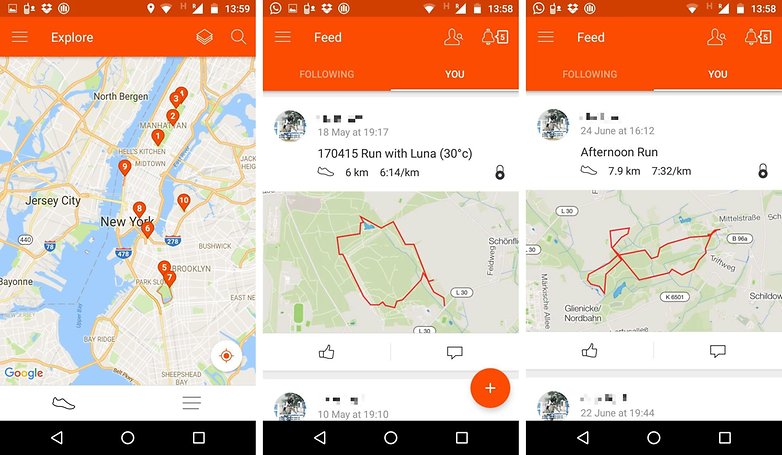
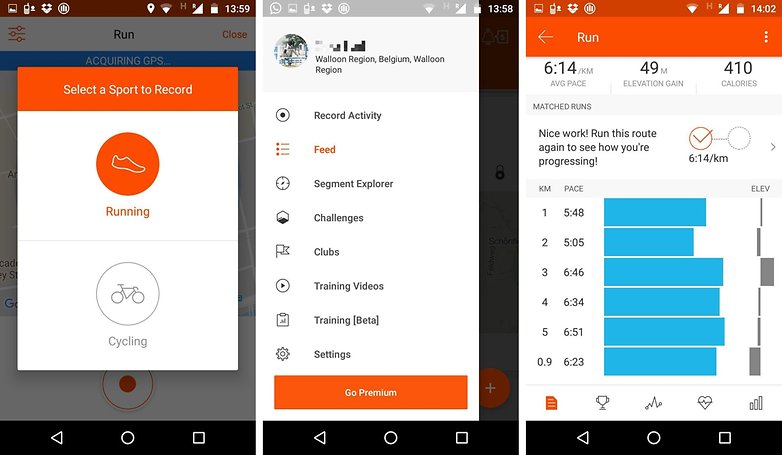
Interface: Strava's interface is clear and well implemented. Since the app is tailored for runners and cyclists, there are clear statistics for runs and bike rides to check out. This way, certain routes can be repeated many times to track your own progress. There are also numerous community challenges, such as a virtual January half-marathon.
Fitness test/warmup/cooldown: Strava skips these points.
Workout: Strava connects to various smartwatches, fitness trackers, running sensors, and heart rate monitors. For endurance workouts, so you can always keep track of your data during your workout. Strava then analyzes your training level and provides advice on the intensity required to hit the desired sweet spot so that you can train at an ideal pace. However, the advanced training features are only available for paying members.
Price: For the Pro features, Strava offers a 30-day free trial membership. After that, depending on how much you pay, you'll be charged between five and eight Euros each month if you want full access to the training dashboard, competition functions against other subscribers, or heart rate analysis.
Alternatives: Many running watches offer apps with a similar range of functions to Strava. I particularly like the Garmin app, which offers detailed training plans for a wide variety of running goals. If you buy a smartwatch, you often receive a comprehensive tool in a single device and do not need a separate app like Strava. Otherwise, Runtastic also has similar apps in its range.
${app-com.strava}You can download the Strava app from the App Store here.
3.3 Freeletics: fitness app, trainer, and nutritionist
Whether it's the app itself on your smartphone or users at your local city park, you're bound to have come across Freeletics at some point in time. The fitness app has managed to bring together both fitness and community aspects like no other and also offers individual trainer coaching and nutrition advice.
Interface: The Freeletics app is well-styled and clearly structured. However, you can feel a bit lost at the beginning with all the workouts from Hera to Athena. A great strength of this app is the community aspect - you can arrange workouts with other Freeletics fans at countless spots.
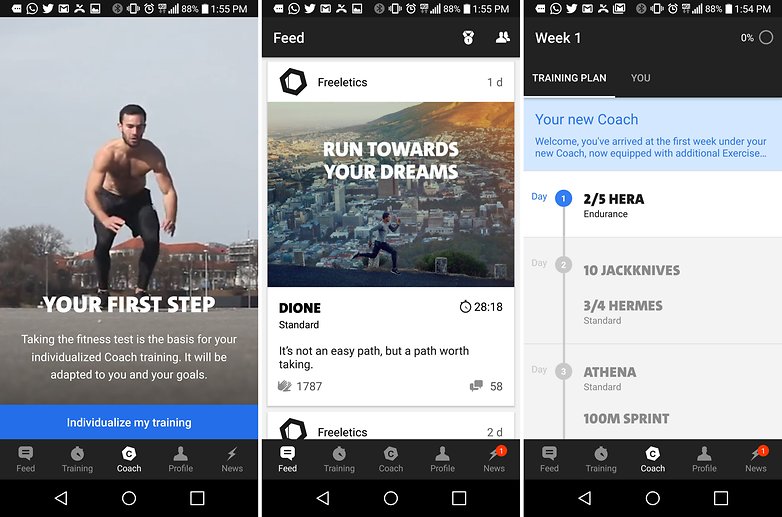
Fitness test: After registering, the Freeletics app asks for some basic data about your personal goals and fitness level. However, you will only be required to complete an actual fitness test if you decide to sign up for an individual training plan, i.e. pay. There is no medical disclaimer here.
Warmup/Cooldown: The Freeletics app offers various warmup and stretching routines. If you want to improve your results, you should take advantage of them.
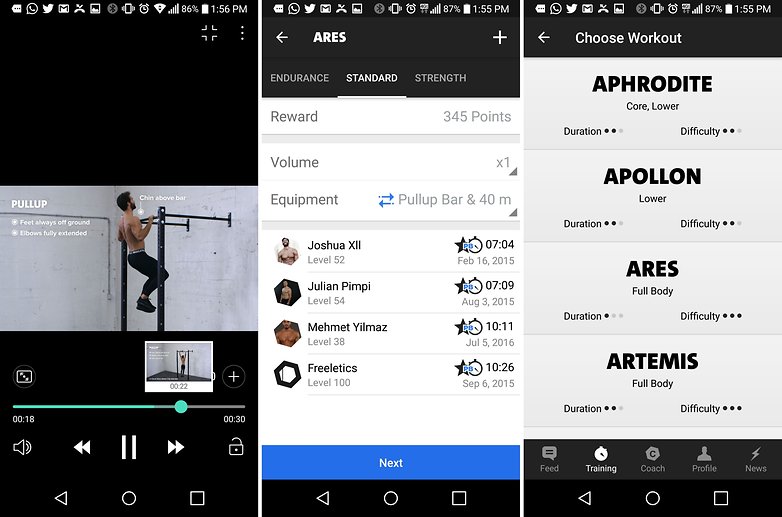
Workout: The workouts are well explained and definitely geared for efficiency, but can also seem a bit monotonous. If you want a common thread in the form of a workout plan, you'll need the paid version of Freeletics - otherwise, you're on your own when it comes to picking routines that you like. And with pull-ups, I would wish for there to be less fidgeting - greetings to the Crossfitters out there ;-)
Price: The free version of Freeletics offers 19 different workouts. If you want to access customized nutrition and training plans, you will have to pay; depending on the package, it costs anywhere from €60 to €90 every six months. To kick off 2021, Freeletics is offering a 30 percent discount. Freeletics apps can be downloaded for free from Google Play and the Apple App Store. Personal coaches, on the other hand, will cost you extra each week. However, the workouts themselves are available for free. The same goes for the workout videos, which are free for download and offline viewing later.
For iOS, you can download the app from the App Store: Freeletics -Personal Trainer.
3.4 Pumatrac: Workouts with celebrity trainers
Sure, Pumatrac is obviously advertising for - surprise, surprise, Puma. But the workout app is really well done and completely free. So, the heavy branding plastered all over the place is totally forgivable in my opinion.
Interface: The Pumatrac fitness app is modern and well-designed. However, nothing works without a login in this case. While there are heaps of well-done workout videos, I find the app lacks complete workout plans that ensure consistent stress and recovery of individual body parts. There's also a community corner that helps you cheering each other on during challenges, and a link to Spotify is also possible, so you can control your music in the app itself. There is also Google Fit integration and apps for various Android Wear devices. If you use an iOS device in tandem with the Apple Watch, then that's not an issue either - because Pumatrac is also available on Apple's devices.
Fitness test: Unfortunately, there is no fitness test for grading. Users are largely left to their own devices to select workouts with suitable intensity. The upside: Workouts in the test do not have any completely insane exercises, so there is no high risk of injury even for beginners.
Warmup/Cooldown: The workouts start with a short warmup session of dynamic stretching exercises, and there is also always a stretching program at the end that keeps the specific muscle parts supple and loose.
Workout: These workouts are elaborately produced, and at the same time remain rather muted, especially when it is compared to the very noisy Les Mills (see below). However, that is simply a matter of preference. What I like here is the structure - before each exercise is performed, it is explained briefly. It is too bad that there are no different intensity levels. What I like about this is the option to go running with the app and integrate workouts from outside the Pumatrac universe.
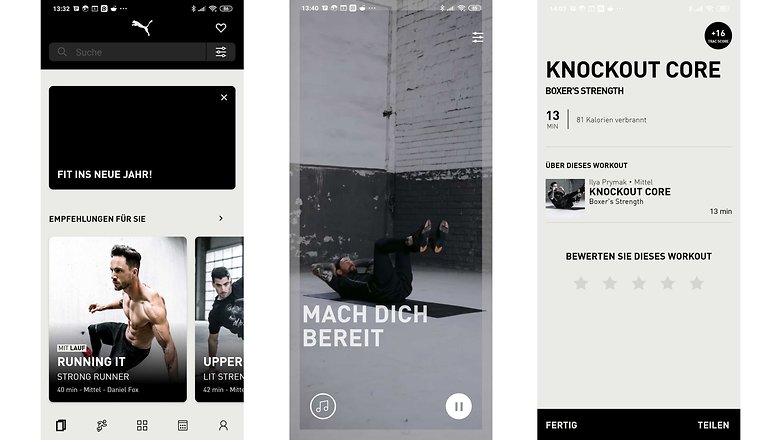
Price: Pumatrac is completely free. But you'll have to live with the fact that the app is heavily branded and comes with an integrated shop where you can - surprise - buy Puma products.
${app-com.pumapumatrac}You can also download the Pumatrac app from the App Store here.
3.5 adidas Training by Runtastic: Get fit in twelve weeks
Runtastic is known to many as a running companion, but with Results, the company has also been offering a bodyweight training program for a few years now. Previously known as Runtastic Results, the popular fitness app is now called adidas Training by Runtastic. The idea of getting fit with a twelve-week plan remains unchanged.
Interface: As you would expect from Runtastic and adidas, the app is smart and clearly designed. To make sure that the social aspect is not neglected, you can share your own logs on various platforms, and you can network with your friends in the app to push each other on to greater heights.
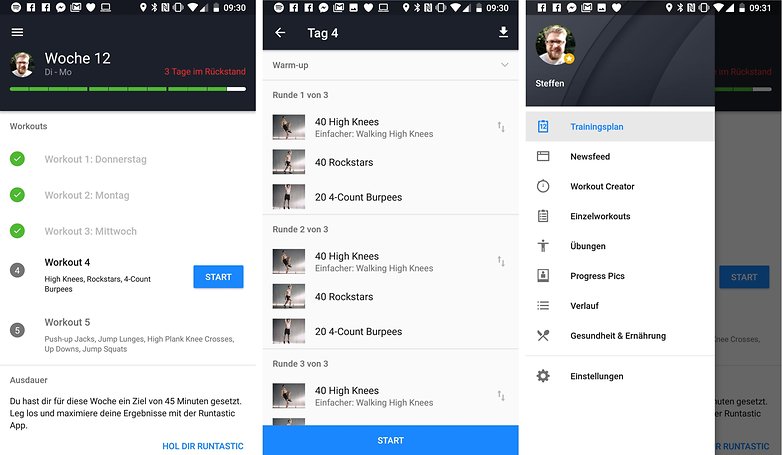
Fitness test: For the initial assessment, the app guides you through a fitness test, which you repeat at the end of the twelve weeks, by the way, in order to see visible progress (assuming you followed the app religiously in the corresponding time period). After the test, you will inform the app on how often you want to or can train per week and obtain a training plan tailored to your needs.
Warmup/Cooldown: Before each workout, Runtastic Results sends you through a four-and-a-half-minute warmup, followed by an eight-minute stretching program. Very nice.
Workout: The workouts are produced as high-quality videos, in which each exercise is explained exactly what you need to pay attention to. The videos themselves are well designed, and thanks to the workout plans, there is a clear path to follow. In the free version, however, there are no tailored training plans, which also do not cover the full twelve weeks but only three to six weeks. But that's enough to get a good impression of the app, before you decide to sign up for a subscription if necessary.
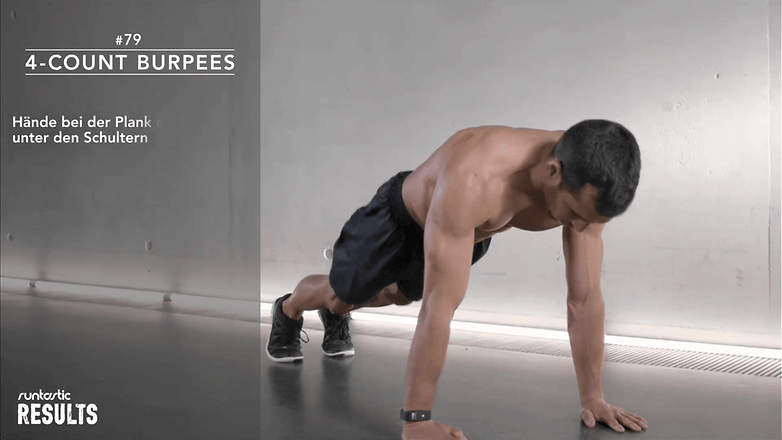
Price: If you pay €10 monthly or €60 annually for the Pro version, you will not only have access to the full scope of Results, including all of the training plans, but also to all other Runtastic apps - and there are many! The company has now more than two dozen apps listed in the Google Play Store, be it for individual workouts like pull-ups or sit-ups, specific goals like altitude training or obtaining a tight butt, to even its own music player.
Find the adidas Training by Runtastic app for iOS here.
4. It's all in the mix: fitness is more than just exercise.
As mentioned at the beginning, fitness apps are only one component of a healthy life. Another important topic is proper nutrition, and the results in this segment can be tracked well with the help of smart body fat scales. Fitness trackers or smartwatches can also be a decent assistant in staying motivated and tracking training successes, for example, based on one's resting pulse heart rate or sleep quality.
You will find a list of further articles on the subject of fitness here:
- Fitness 2.0: Lose weight healthily with fitness trackers and apps
- What does your resting heart rate, SpO2, REM sleep, etc. really tell?
- The best calorie counter apps compared
- Watch your step: here are the best pedometer apps for Android
- How to count calories with your smartwatch or fitness tracker
- The best fitness trackers compared
- The best Apple and Android smartwatches
Of course, there are hundreds more fitness and health apps out there. So feel free to drop us a note in the comments of which ones you're using to burn your Christmas dinner back that has accumulated around your waist, and which are the ones that have made it into your daily workout routine.
This article was revised on 3 January 2021. Some comments may refer to apps and aspects that are no longer listed in this article.













Oh, but what about Nike Run Club ?(