Thumb Keyboard (Phone/Tablet) - Better Typing on Tablets


A huge variety of alternatives to your standard Android keyboard are now available to users worldwide. Most of these keyboards have been designed for normal standard-size phones. For the many Android Tablets out there on the market, however, the number of keyboard options is still very limited. With any display screen larger than 5”, it’s better and more efficient to type with your index finger or use a slide keyboard. SwiftKey – a favorite among Android users – has already come out with a new version tailored for Tablets. Now with Thumb Keyboard (Phone/Tablet) there is another viable alternative input method available for people to try out. As an Archos 70 user, I just had to get my hands on this app…
| Reviewed version |
| 2.7.4 |
Features & Use
As you can tell from the app name, Thumb Keyboard (Phone/Tablet) is designed to be used with your thumbs, which is the way most on-screen keyboards are laid out. Thumb Keyboard includes 7 different keyboard layouts made to fit screens ranging from standard to 10”. Here they are in detail”
- Phone – Large Layout
- Phone – Compact
- Layout Tablet 5”
- Layout Tablet 7”
- Layout 1 Tablet 7”
- Layout 2 Tablet 10”
- Layout Standard Layout
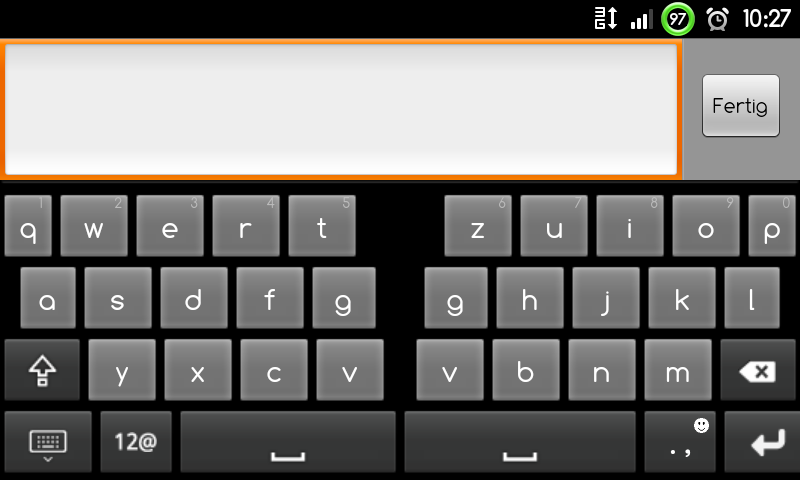
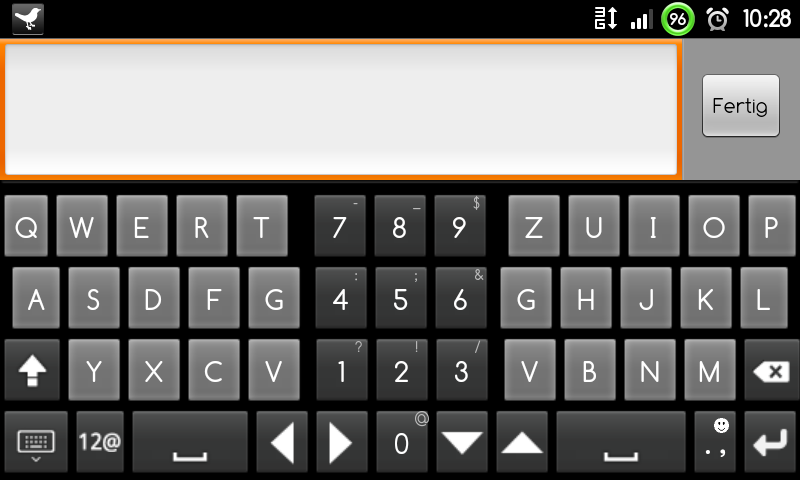
With the exception of the standard layout, the keyboard is split down the middle into two sections. These two sections get slide out to the sides in landscape mode and get pinched together in portrait mode. You can get a better idea of what I mean by looking at the screenshots. This type of keyboard layout makes it easier for both of your thumbs to reach all of the keys. The split keyboard also allows more room for extra symbols and letters.
On my Nexus One, I had a lot of trouble adjusting to the split keyboard in portrait mode, but I have to admit that the keyboard is much easier to use in landscape mode than the standard Android alternative. The real advantages of Thumb Keyboard become apparent on larger devices. On the Archos 70, for example, the 7” layout is perfect for typing with comfort and ease in landscape mode. Having tried out this layout on my tablet, I quickly realize there would be no going back to the regular keyboard for me. It did, however, take me longer to get used to using the same layout in portrait mode (i.e holding the device vertically).
As far as the different layouts are concerned, it really makes sense to try them al out individually. It is, for example, entirely possible that the 5” layout works really well with your normal Android phone or tablet. For a more customized fit, you can create customized keyboard layouts in both portrait and landscape modes in the settings.
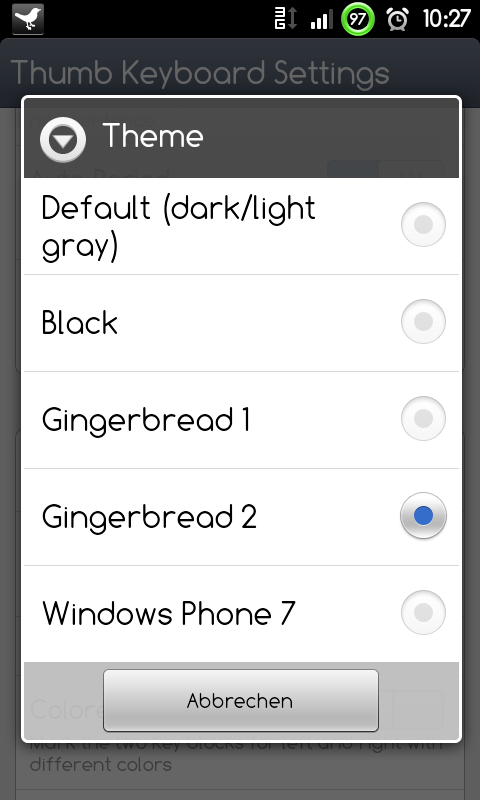
You can select between QWERTY, QWERTZ and AZERTY keyboards, customize the size of the keys, and choose between five different keyboard themes.
Thumb Keyboard includes five T9 dictionaries (English, German, Dutch, French and Italian) that are far from perfect. The word recognition is really not up to par and is not as good at deciphering your typos as the HTC keyboard. The dictionary itself is also much more limited. Finally, you can’t quickly switch between keyboards without going into the app’s settings – a big setback for individuals that type in several different languages intermittently.
Bottom Line:
As a result of problems with word recognition and the built-in dictionary, I can only give four stars here. Nevertheless, the keyboard is definitely a good fit for Android tablet users. In the end, it’s going to take you a good month to figure out if it’s worth replacing your regular keyboard with this new one. That’s why it makes sense to buy Thumb Keyboard on the AndroidPIT App Center with its 24-hour return policy.
Screen & Controls
As with all alternative keyboards, you first have to activate Thumb Keyboard (Phone/Tablet) as your default input method (Menu Button/Settings/Language & Keyboard). This is also the place to adjust the keyboard’s internal settings.
Using this keyboard is basically like using any touch screen keyboard you’ve encountered so far. Long-pressing the layout button pops up a menu where you can choose between several different layouts.
Depending on the keyboard layout, one key can be used to include several letters, numbers and/or symbols. By long tapping a key, you can select the second “hidden” symbol. Some keys include up to three or four different symbols that you will have to click through.
Each layout is different, so it takes a while to get the hang of each individual one. In my opinion, Thumb Keyboard is a real must-have for tablet users.
In the Thumb Keyboard settings, you can adjust key sounds/vibrations and turn word recognition and spell check on/off. This is also the place to adjust the layouts and key size.
Bottom Line:
Due to its unconventional split-design, Thumb Keyboard definitely takes a little getting used to. As I see it, Thumb Keyboard is geared primarily towards tablet users rather than regular Android touch screen phones.
Speed & Stability
The speed of Thumb Keyboard (Phone/Tablet) is simply superb! No lags or delays that screw up your typing flow as is often the case with the HTC keyboard.
Price/Performance Ratio
Thumb Keyboard (Phone/Tablet) can be downloaded for €0.99 ($1.35) from the Android Market. At the AndroidPIT App Center Thumb Keyboard is available at €1,19 ($1.60) a pop.
Screenshots







Recommended editorial content
With your consent, external content is loaded here.
By clicking on the button above, you agree that external content may be displayed to you. Personal data may be transmitted to third-party providers in the process. You can find more information about this in our Privacy Policy.