Autorun Manager - Prevent Automatic Startups


Read in other languages:
There are a lot of apps out there that seem to start up automatically whenever they please. Some apps just seem to have a mind of their own and start up on their own without ever asking for your permission. Autorun Manager is meant to put an end to all this chaos and put all your apps in line with what you want.
Find out how Autorun Manager can help you obtain control over your phone’s renegade apps.
| Reviewed version |
| 2.0.5 |
Features & Use
As most Android users will tell you, it’s usually a good idea to prevent unwanted apps from starting up automatically in the background without your knowledge. But that doesn’t mean that you should strive to kill all auto-starts because a few apps may be actually vital and essential to your phone. The Android autostart and the Windows taskbar are not the same thing – a common misconception among Android newbies. Apps can create so-called event listeners (also know as intents) that are there to track certain activity (e.g. incoming calls, internet connections, start up etc.) and are part of the installation package. These intents are necessary for your phone to ring for incoming calls or to receive text messages without having to start up your messenger. These kinds of processes are integral to your phone and must not be killed.
While there may be certain important automatic start ups, there’s also a lot of rubbish that autostarts and saps your precious battery life. More often than not it’s the app’s developers that include an autostart feature in the installation package without you ever noticing it. That’s why Facebook, for example, starts up every time I turn on my off even if I’m not actually using it.
There are two possibilities for getting rid of these unwanted apps: you either delete the embedded event listener (requires root permission) or you simply close the app after it starts up (no root needed). There are some apps available for both options: AutoStarts for the former and Startup Auditor for the latter.
With Autorun Manager you can kill two birds with one stone because it works both ways and even outperforms its competitors!
Without Root (Basic Mode)
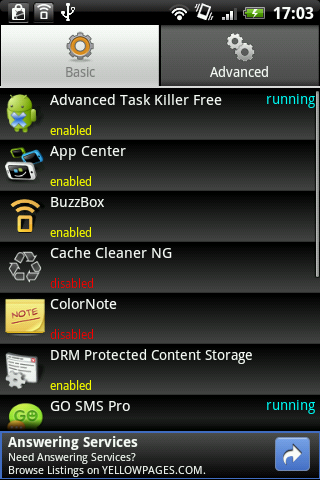
Here you can disable multiple apps right after start up. This doesn’t display all the intents, but only the ones that say boot completed. In regular English, this means that only apps that start up directly after booting are shown. In addition, you have the option of configuring the app to recognize automatic restarts and automatically kill the app when this occurs. With most other apps of this kind, automatically killing the apps leads to an endless cycle of start-kill-start-kill that is both frustrating and very bad for your battery life. Thankfully, Autorun Manager can determine when this type of vicious cycle happens and mark an app as such. This way you’ll know to avoid disabling that app.
With Root (Advanced Mode)
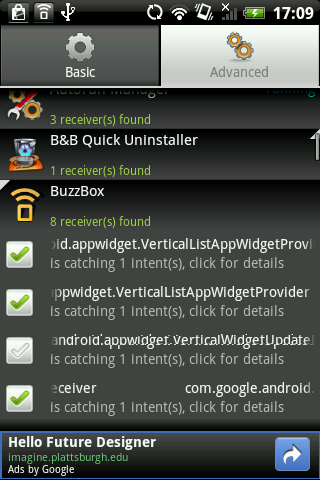
This allows you to deactivate intents yourself. Turning off the intents means that the app won’t start up in the first place. This gets rid of all your problems altogether. It’s not al fun and game, though, so please keep one thing in mind: make sure to undo any changes made by Autorun Manager before uninstalling it. Otherwise these changes will be permanent and you will no longer be able to reverse them even if you reinstall Autorun Manager. Fortunately, the app lists all changes in the settings under Advanced Mode.
Another big plus: unlike other apps, you can restore everything back to its original clicks in just three clicks Advanced tab -> Menu Button -> Restore Everything. Done!
Bottom Line:
Autorun Manager is unbeatable in its category. The app includes everything you could ever ask for. Without a doubt the best autostart killer on the market.
Screen & Controls
Despite being such a complex app, Autorun Manager is surprisingly easy to use. You don’t need to be an Android guru to figure out the ins and outs of this app. The default settings are set up to protect from damages by other people using your phone. All the system apps are hidden you have to turn on the Advanced Mode yourself in the settings.
Bottom Line: Great intuitive controls and efficient layout.
Speed & Stability
Awesome performance in terms of speed and reliability as well. Not only does Autorun Manager run smoothly, but it scans all your intents in record time. Crashes? None whatsoever.
Screenshots

















I can i reset my xtreme tablet
For me the issue is not whether or not an app will effectively kill an app for free or save me some battery or memory its about the principle of being able to load up what I want when i want to and not have to kill something i am not using. Case in point is google play. I didn't ask for this level of intrusion or 'convenience' as google will no doubt call it.
I dont care what you say but I walk outside and start my car when i am going to use it. I do not want it pre started and warmed up and all my contacts told i might be using it to visit them when i pick up my keys from the sideboard. I also dont want it ready to trace where i have been or let the world know where i am or where i have been, whether i might subsequently tell them or not - its my choice and nobody elses.
When people ring me to tell me about offers on double glazing I make a point of telling them that even if I was interested in the product/ offer etc I would as a point of principle make sure I will not give them my business as I object to their approach and question their morality as a result. I approach Android and the apps you cannot turn off with the same sight. There is a market for not intrusive service and a big one. Android was sold to me on that basis and I am not getting what was promised.
Thanks, appreciate the, lets say innocent intention to service my every possible wish, but the execution makes me think I am in fact being spied on rather than helped and the fact you won't let me turn it off just adds to the disgust.
Suddenly Googles initially refreshing approach now smells as bad if not worse than the Microsoft and Apple world domination approaches, which smell, but not as bad as this. Just saying, I may be wrong and cynical, but prove me wrong by turning it off.
I think it's awful that this review doesn't state that this app isn't actually free. To make the app do the stuff described, to any useful extent, requires a donation so this app is far from free. I resent being tricked into paying for something and wasted 5 minutes of my life down loading it only to realise this. The reviewer has a duty to inform us truthfully whether this app is truly free or not and on this occasion he / she has failed miserably and I only wonder why. This doesn't seem like an unbias, independent, review to me.
I love this app... if you have a rooted device... this app gives you total control.