Ringdroid - Let it ring, let it ring, let it ring!


It’s half past seven in the evening, you’re standing in a completely overcrowded train wagon on your way home. You are literally rubbing shoulders with strangers, trying to hold on for dear life when all of a sudden a generic ringtone fills the compartment—and sets off a frenzy of people hectically looking for their phones. If this sounds at all familiar to you you might want to check out Ringdroid: this Android classic allows you to create an mp3 as ring tone so that you can stand out in a crowd.
Sounds appealing? Read on and find out what else Ringdroid has to offer.
| Reviewed version |
| 2.5 |
Features & Use
First impressions: A great tool for editing sound files
Ringdroid starts off with an overview of songs and sound files already saved to your SD card. I was pleasantly surprised at the overview’s cool design. If you’re not planning on making use of it, opting instead to record something yourself, press on the ‘Record Now’ button and you will be linked to a recorder (the design is simple but, again, very nice). There’s an analogue display of an input signal, but it’s purely for show: even when peaks aren’t clean at all the display doesn’t wander into the red zone.
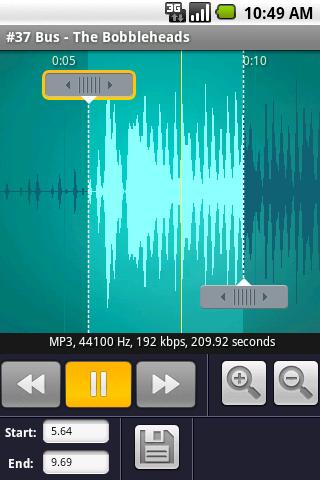
Once a sound file has been selected you will see a really nicely designed frequency display which shows the first 15 seconds of the selected track (per default). If you think that you are now master and commander of editing you are both right on the money and sadly mistaken at once: you are right because you can select when the track should begin and when it should end. You’re wrong because once you’ve selected your song fragment you won’t be able to edit it whatsoever. Effects such as fade in/out, fine-tuning the pitch or editing out bars from the middle of the song are – sadly – not available.
If you’re not massively bothered by this you can go ahead and save the selected track fragment. A word of warning though: the sound file will only play for the category you have assigned it to. The existing categories are Music, Alarm, Notification, Ringtone. This means that if you’ve selected Alarm you won’t be able to use the song snippet as a ring tone.
Bottom line:
A great app that lets you cut up your favourite sound files and turn them into ring tones, alarm tones, etc. It doesn’t seem like Ringdroid is out to compete with ultra-classic tools such as Audacity, but a few effects options would be a welcome addition to this Android app.
Screen & Controls
Ringdroid is quite exemplary as far as controls go. They are easy and intuitive, the screen is neat and easy to navigate and the layout is well thought-through and nicely designed. All in all the app is very easy to create an mp3 as ringtone.
Speed & Stability
There weren’t any issues with Ringdroid’s stability during our test run. There were, however, a few brief lags when it came to playing MP3 files in the wave mode, but this only occurred once.
Price/Performance Ratio
Ringdroid is available free of charge from the Android Market.
Screenshots









i like
uhuh ;-)
good